
ClassiPod
AdeeteyaMusic & Audio
3.991.00 Reviews
- Version
- 1.12.0
- Installs
- 100.00K
- Age Rating
- Everyone
Screenshots
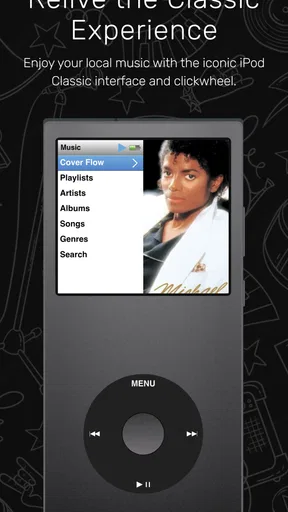
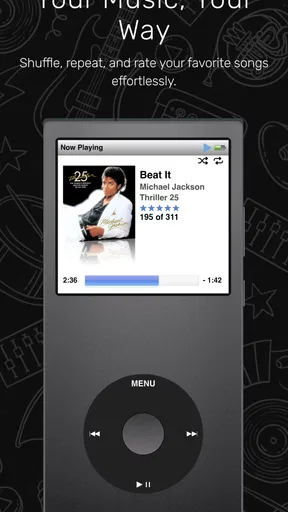
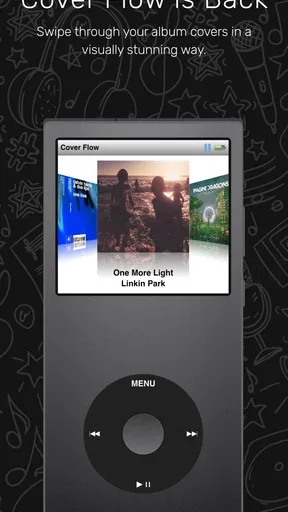
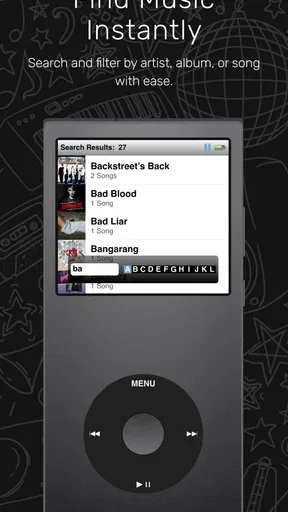
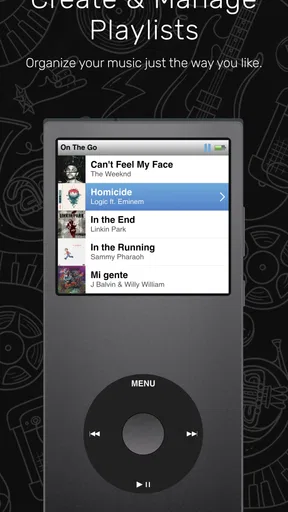
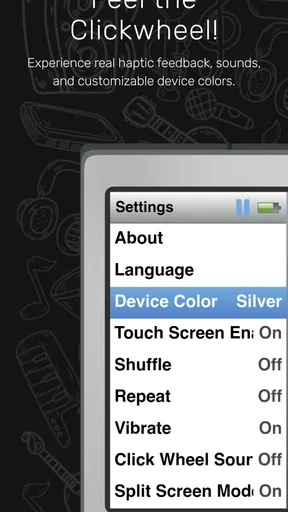
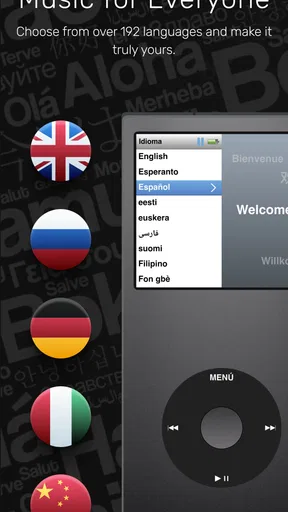
Our Review of ClassiPod
 Analysis by Appyee
I have always liked the idea of keeping a small music library on a phone instead of depending on a streaming subscription, and ClassiPod is built around that feeling. It is a local music player for Android that tries to bring back the character of the iPod Classic rather than behaving like another streaming catalog. After spending time with it, I see the appeal: the app feels focused, nostalgic, and pleasantly separate from the constant recommendations and account prompts found in larger music services.
That focus also defines its limits. This is not the app I would choose for discovering new artists, sharing playlists with friends, or moving between several streaming platforms. I would choose it for a household member who already has music files stored on a phone and wants a simple player with a classic-device atmosphere. It is free, rated for Everyone, and developed by Adeeteya, so the barrier to trying it is low. The important question is whether its local-library approach fits the way you actually listen.
How ClassiPod works in a shared household
The most convincing everyday use case is a shared listening situation where one person wants music without handing over a streaming account. Imagine a family road trip in which a phone contains downloaded albums, children’s audio, or a carefully collected personal library. Instead of opening a service tied to someone’s recommendations, the listener can use a dedicated local player and leave the main music account alone.
That separation is useful, but it should not be confused with a family-management system. ClassiPod is a music player, not a tool for creating separate household profiles or supervising listening habits. If several people use the same phone, everyone is effectively working with the same local library and the same device environment. I would therefore treat it as a shared playback option, not as a way to establish firm account boundaries.
For a parent, partner, or roommate, the practical advantage is control over the music collection itself. Music already placed on the device remains the source of what can be played. That makes the experience predictable: there are no surprise recommendations appearing because another person listened to a different genre, and there is no need to explain which streaming profile should be selected.
The trade-off is equally clear. A shared phone can become confusing when several people add files, rename folders, or use different ideas of what belongs in the library. ClassiPod does not magically solve that organizational problem. Before sharing the device, I would agree on a simple folder or naming convention and avoid treating the player as a communal storage box for unrelated audio.
What the iPod-inspired approach changes
The main difference from a typical modern music app is the feeling of browsing a collection rather than searching a service. The iPod Classic influence gives the experience a more deliberate character. I found myself thinking about albums and saved tracks instead of jumping between algorithmic suggestions. That can be refreshing when I want to listen to something I already chose.
This approach is especially good for people who prefer ownership or offline access. A local player does not need to keep persuading me to continue listening, and it does not turn every session into a discovery exercise. For a child using a household phone, that narrower environment can also make the listening task easier to understand: choose from what is there, start playback, and stop when finished.
Still, the classic-player idea may feel restrictive if your habits are built around cloud libraries. Streaming users often expect instant access to an enormous catalog, synchronized playlists, lyrics, social sharing, and recommendations. ClassiPod is better understood as a companion to that ecosystem, or an alternative for a local collection, rather than a replacement for every part of it.
Setting up the library without creating household confusion
The first thing I would do after installing the app is decide whose music the device is meant to hold. That sounds obvious, but it matters more with a local player because the library depends on files that are already available on the phone. If the device belongs to one person, setup is straightforward. If it is shared, a little planning prevents the app from becoming a messy list of albums with no clear owner.
A useful workflow is to prepare the music outside the listening session. Put each person’s albums or audio collections into clearly named folders, use consistent artist and album names, and remove duplicates before opening the player. This is not a special feature of ClassiPod; it is a practical way to make a local library easier to live with. The app can only present the material it can access, so the quality of the organization around it directly affects the experience.
I would also test the library with the least technical person in the household. Can they identify their music quickly? Can they return to an album without asking for help? Does the structure make sense on a smaller screen? A setup that looks tidy to the person who created it may still be awkward for someone else. That short test is more valuable than assuming everyone will understand the arrangement.
Because the app is free, it is easy to try without turning setup into a financial commitment. Its minimum operating requirement is Android 7.0, which makes it relevant to older compatible phones that may be used as dedicated music devices. The current release is version 1.12.0. I would still keep expectations realistic: compatibility with an older phone does not make the device’s storage, speaker quality, or file organization better.
A boundary worth explaining before handing over the phone
In a shared setting, I would explain that ClassiPod plays the local collection rather than acting as a universal music account. That single sentence prevents several misunderstandings. Someone expecting to search for any artist may think the app is broken when the music is not stored on the phone. Someone expecting their personal streaming playlists may assume they will appear automatically. They will not be part of the experience unless the relevant audio has been prepared locally.
This boundary is also helpful for privacy. A person using the phone can listen to the collection available there, but that does not mean they have access to another household member’s online music account. For shared devices, I prefer this limited scope because it reduces the chance of accidental account switching or unwanted changes to a streaming profile.
The limitation is that local music requires maintenance. When a new album is added, the household may need to decide where it belongs and whether everyone should see it. When files are removed or moved, the listening experience can change. If you want a service that handles synchronized libraries across several devices with minimal effort, a mainstream streaming app remains the easier option.
Coordinating listening between different people
ClassiPod works best when the household agrees on what the device is for. It could be a personal offline player, a child-friendly music phone, a road-trip library, or a backup device for someone who does not want a streaming subscription. Problems begin when each person assumes it serves a different purpose. One person may want a private collection, while another treats it as a general jukebox.
I found that a simple rotation works better than constant rearranging. Keep a stable core of albums that everyone can use, then add temporary folders for a trip, a party, or a particular listener. Once the event is over, remove the temporary material. This keeps the app from filling with one-off audio and makes it easier to find the music that matters day to day.
For a family car, I would prepare the device before leaving rather than trying to organize it while driving. A passenger can choose what plays, but the driver should not be expected to search through a cluttered collection. The local approach is valuable here because the music can be ready without relying on a live connection, but the preparation remains the responsibility of the person managing the phone.
For roommates, the best arrangement may be less communal. Each person can keep a clearly labeled collection, with an agreed rule that nobody renames or removes another person’s files. ClassiPod can support the playback side of that arrangement, but the social agreement is what protects the library. That distinction is important: the app simplifies listening, not household coordination by itself.
Where it differs from ordinary music alternatives
Compared with a streaming service, ClassiPod gives me a smaller but more controlled listening space. Streaming wins when I want breadth, discovery, synchronized access, or a library that follows me across devices. The local player wins when I already know what I want, need offline playback, or want a device that does not expose someone else’s account and recommendations.
Compared with a basic file manager, it is more appropriate for regular listening because it is designed as a music player rather than a place to manually open audio files one by one. The iPod-inspired presentation is part of the appeal: it encourages browsing a music collection in a way that feels more intentional than tapping through storage folders.
Compared with a more advanced local player, the question becomes how much control you need. Audiophiles or highly organized collectors may prefer an app with extensive playback settings, detailed tagging tools, or elaborate synchronization. I would not select ClassiPod simply because I wanted the longest feature list. I would select it because the focused, classic-player concept is more important to me than exhaustive customization.
Age, trust, and realistic expectations
The Everyone content rating makes the app a reasonable candidate for a general household device, but an age label should not be treated as a complete family-safety plan. The music available through a local library still depends on what an adult or device owner places there. If children use the phone, the collection should be reviewed before handing it over, especially when the device contains audio from several people.
That is one of the strongest trust advantages of a local player: the owner can curate the available material directly. It is also the central responsibility. A child cannot be protected from unsuitable audio merely because the player itself is simple. The safe setup is a deliberately prepared library, a clear explanation of what the phone is for, and ordinary supervision appropriate to the child and the situation.
I would also avoid presenting the app as a substitute for a separate child account. It does not create a new identity for each listener, and it should not be expected to isolate one person’s activity from another’s. If account separation, synchronized profiles, or detailed family controls are essential, a service built around those functions is the better choice.
Trust matters for adults too. A partner may be happy to share a phone containing a neutral local collection, while feeling uncomfortable using a device connected to another person’s streaming account. ClassiPod’s narrower role can make that handoff easier. At the same time, everyone should know that local files and library organization remain visible to other people who use the device.
Who will appreciate it most
I would recommend it to someone who owns or maintains a local music collection, likes the iPod Classic era, and wants a free Android player with a focused purpose. It is also a sensible choice for an older compatible phone that will be used as an offline music device, provided the library has been prepared carefully.
It suits listeners who are tired of recommendations, do not need a huge online catalog, or want to keep a child or guest away from their main music account. The current audience appears substantial enough to show that the concept has found interest, with more than a hundred thousand installs and an average rating of 3.9 from roughly a thousand ratings. I read that as a promising but not universally loved experience: enough adoption to take seriously, but not a reason to assume it will fit everyone.
I would skip it if your music life is mostly streaming, if you change devices often, or if you expect automatic synchronization across household members. I would also look elsewhere if advanced audio controls, extensive metadata editing, or collaborative playlists are central to your routine. Its strengths are concentration and simplicity, and those strengths become weaknesses when you need a full music ecosystem.
My household verdict
After using ClassiPod, I see it as a thoughtful local music option rather than a general-purpose replacement for Spotify-like services. The iPod Classic inspiration gives it a recognizable personality, while the local-library model makes it practical for offline listening and shared-device situations where account boundaries matter. I like that it encourages me to listen to the collection I have instead of constantly searching for something else.
My recommendation comes with one condition: prepare the device intentionally. Decide who will use it, organize the files before adding more, and explain that the app plays local music rather than providing an unlimited catalog. Those steps make the experience much smoother for families, roommates, and anyone handing an older phone to another listener.
For a household that wants one carefully managed music library, the app is easy to understand and inexpensive to try because it is free. For a household that needs separate profiles, cloud synchronization, or built-in family management, it is the wrong tool. In my view, that clarity is its biggest virtue. ClassiPod is at its best when you want a personal, offline collection to feel like a dedicated music player again.
Verdict
Strengths of ClassiPod
- Simple interface makes browsing classic music easy.
- Supports playlists for organizing favorite tracks.
- Lightweight design uses minimal device storage.
- Quick search helps locate artists and songs efficiently.
- Suitable for users who prefer a nostalgic music experience.
Limitations of ClassiPod
- May lack the catalog size of major streaming platforms.
- Some features may require manual music organization.
- Audio quality can depend on the imported or available files.
- Limited modern recommendations may reduce music discovery.
- Compatibility may vary across newer iOS and Android versions.
Similar Picks in This Category
View All
YouTube Music
Google LLC4.4

Samsung Music
Samsung Electronics Co., Ltd.3.8

Spotify: Music and Podcasts
Spotify AB4.3

JioSaavn - Music & Podcasts
Saavn Media Limited4.3

Lark Player:Music Player & MP3
Lark Player Studio - Music, MP3 & Video Player4.6

StarMaker: Sing Karaoke Songs
SKYWORK AI PTE. LTD.4.3
Frequently Asked Questions
What is ClassiPod and what can I use it for?
ClassiPod is an educational application designed to help users access and organize learning content in a convenient digital format. Depending on the available version and included courses, it may provide lessons, study materials, audio or video resources, and tools for following academic progress. Before downloading, check the app’s current description to confirm that its subjects, teaching level, and supported languages match your learning needs.
Is ClassiPod free to download and use?
ClassiPod may be available as a free download, but some lessons, courses, features, or additional materials could require payment, a subscription, or an account. The exact pricing model can vary between Android and iOS and may also change with updates. It is advisable to review the store listing and in-app purchase information carefully so you understand what is included before committing to the platform.
Does ClassiPod require an internet connection?
An internet connection may be needed to download the application, create or verify an account, load course content, synchronize progress, and access online lessons or media. Some educational resources might be available offline after being downloaded, although this depends on how ClassiPod handles its content. If you plan to study while traveling, test the offline functionality and confirm which materials remain accessible without mobile data or Wi-Fi.
Is ClassiPod suitable for children and students of all ages?
ClassiPod’s suitability depends on the subjects, curriculum, difficulty level, and teaching approach offered in the current version. Parents and students should review the app’s age rating, privacy information, and content description before installation. Younger users may also need parental supervision, particularly if the app includes communication tools, external links, advertising, account registration, or purchases. Always verify that the lessons are appropriate for the intended learner.
What devices are compatible with ClassiPod, and is my progress synchronized?
Compatibility depends on the operating system version and the requirements published on the official Google Play Store or Apple App Store listing. ClassiPod may support phones and tablets, but older devices could experience slower performance or limited functionality. Progress synchronization is usually dependent on signing in with the same account and having an active connection. Check the latest requirements before downloading and keep the app updated for the best experience.
